
Across the vast digital landscape, communication tools continue to evolve and demonstrate their usefulness in practice; Telegram is one of them. Its ecosystem continues to grow, offering users a rich experience. However, things are not as ideal as we might imagine. Because Telegram does not offer a direct way to switch to Chinese, many users are disappointed. Users in mainland China need to set Telegram to Chinese so that all pages display in Chinese and are easier to use.


Presumably, before learning how to set Chinese on the desktop version of Telegram, everyone already knows that Telegram does not have a Chinese interface setting. Although Telegram is a very practical application, it does not have a Chinese interface due to regional reasons, which forces users in mainland China to look for ways to set Telegram to Chinese. Next, let's introduce how to set the computer version of Telegram to Chinese.

Ways to Set Chinese on Desktop Telegram
Many people searching for ways to set Telegram to Chinese should have learned about Chinese language packs and perhaps discovered that there are many types of Chinese packs for Telegram, offering users a variety of choices. The only downside is that for various reasons, many Chinese packs have stopped being maintained. To avoid encountering this situation, it is recommended that you learn about zh_CN, which has not only been maintained for many years but is also very simple to operate.
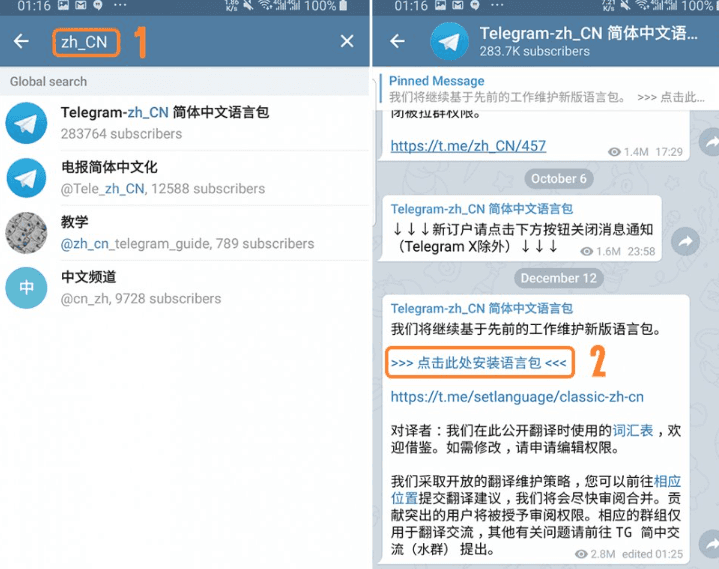
We can directly enter zh_CN in the search interface of Telegram and click on the safe result in the search results below. This Chinese pack is continuously updated with version updates, and the developer has been maintaining it, so it is currently quite easy to use.
If you are not sure which installation pack to choose, you can click the link directly: https://t.me/setlanguage/zhcn, and use the browser on your computer to open it. After you click, the system will automatically jump to the software page of Telegram. Then click "Change" as prompted on the page to see the Telegram page switched to Chinese.
Setting Telegram to Chinese Using Third-party Software or Translation Tools
Among the vast number of methods for setting Telegram to Chinese, third-party tools and translation plugins are also quite good, and I recommend them to everyone here.
Third-party tools: It is "Turrit", which is a piece of software similar to a Chinese version of Telegram. You only need to download the software and set it up according to the software instructions, and then you can log in to your Telegram account. For example:
We need to first open the app store on the mobile phone, search for "Turrit", and then click install. After the installation is successful, the system will prompt you on how to operate. Just follow the prompts here. After the setup is complete, click login and enter your Telegram account. Once you log in successfully, you will find that the page is displayed in Chinese.
Translation tools: There are many translation tools, such as Google Translate, DeepL Translate, etc., and they can also accurately translate the content in Telegram. The only drawback is that they cannot translate all the content on the Telegram page at once; users need to copy and paste it into the translation tool to get the translation results. Using this method to set Telegram to Chinese is relatively more troublesome, but the translation results are quite good.
Telegram has proven its value with its actions, and tech-savvy individuals in mainland China have proven with their technology that Telegram can also be quickly set to Chinese in mainland China. As for users, they should also use their own judgment to choose the right tools to set Telegram to Chinese.
