
Everyone is familiar with Telegram. Although it is foreign software, many users in China have welcomed it. The only drawback is that its English settings are not user-friendly for users in China. Many people download Telegram and find that the entire interface is in English. They want to change the language to Chinese in Settings, only to discover that Telegram does not have a Chinese version, leaving many users who are not familiar with English at a loss. People have also begun discussing how to set Telegram to Chinese.


For users in China, the biggest problem with Telegram is that there is no direct option to switch to Chinese. As a result, many users in China have given up using it. While looking into how to set Telegram to Chinese, many people find that it is actually quite simple and requires no complicated steps; it can be done almost with one tap. If you are worried that limited English will prevent you from using Telegram normally after downloading it, don’t worry. The following two methods will show you how.

Set Telegram to Chinese with a Language Pack
Previously, many people asked why everything is in English after logging into Telegram and why there is no Chinese option in Settings. The main reason is that the official version does not provide a Chinese version at all, making it very difficult for us to set Telegram to Chinese. But this difficulty cannot stump tech experts: they developed a built-in language pack for Telegram so users can switch the interface directly to Chinese. Users can get it directly through tg://setlanguage?lang=taiwan.
Getting it is simple. In Telegram, find the search bar and paste this URL into it to search. Then, on the page that appears, click the “Chabge” option. Telegram’s interface will switch to Chinese after you click it.
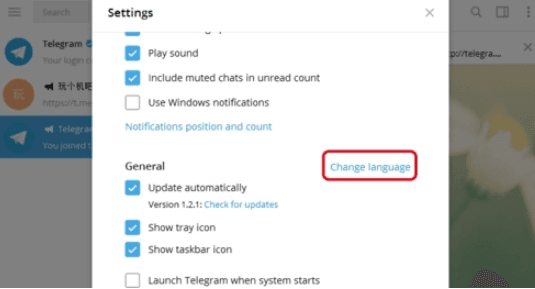
Isn’t that simple? Although this language pack is not provided officially, the Chinese translation quality is high and can meet users’ needs.
If you are worried that the link may have security risks, you can also obtain the language pack through the official Telegram group.
On a computer, search for “@zwdhqun” and select the TG Telegram group to enter. Type “中文包” (“Chinese language pack”) in the chat, and the bot will send you a link to get the pack. Follow the prompts to switch Telegram to Chinese.
Set Telegram to Chinese with Third-Party Software
After logging into Telegram through third-party software, you can also switch to Chinese. When you find that you cannot switch language display directly through Telegram settings, you can try this method.
This article recommends using “Turrit”, a third-party app that is equivalent to a Chinese version of Telegram. Its Chinese translation quality is high, and it is easy to use; you only need to download “Turrit” on your phone. After installation, follow the prompts to set it up, then use the app to log in to your Telegram account. Once logged in, you will see all pages displayed in Chinese, making it easier to communicate with other users without worrying about language barriers.
The different methods for setting Telegram to Chinese involve different steps. Since these tools are not provided by Telegram’s official website, they may be unstable during use. To help everyone switch Telegram to Chinese whenever needed, be sure to review the relevant information carefully before using them. This will help you understand the risks and address any concerns.
