
Many users say that when they use telegram, all the content is in English and the settings interface has no Chinese option. This can be inconvenient for people who are not comfortable with English. Why can’t it be set to Chinese? We found that telegram is an instant messaging app whose language options vary by region. For users in mainland China who want to use telegram conveniently, the best option is to configure telegram in Chinese.


However, telegram does not have a direct option to switch the app to Chinese, so many users do not know how to set telegram to Chinese. There are actually many ways to change telegram to Chinese, and most are very simple. Follow the steps below to set up telegram in Chinese.

Ways to set telegram to Chinese
Although the telegram interface has no Chinese language option and does not let us switch telegram directly to Chinese, this does not stop users from finding a solution. Some technically skilled users have developed ways to configure Chinese for telegram. These methods let us switch telegram to a Chinese version. Below is one convenient way to set telegram to Chinese.
Method one: Use a language pack
First, open the telegram app and go to its main interface. At the top of the page, find the search box in the middle. Paste this link into the search bar: tg://setlanguage?lang=taiwan.
After searching, the system will display a new option. When it opens a new link, tap it. In the pop-up, tap “Chabge” and the interface of telegram will switch to Chinese.
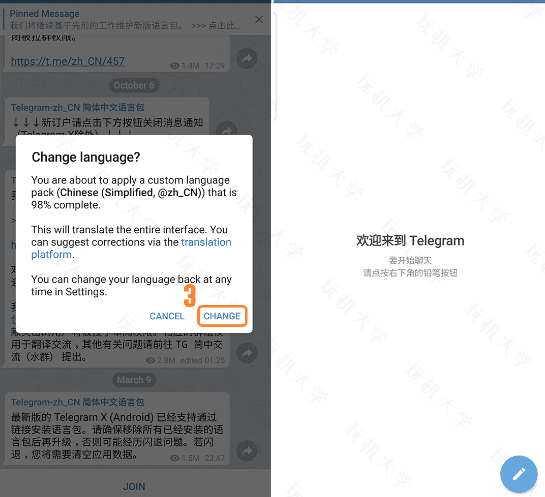
You might ask: didn’t we say that telegram has no option to set Chinese? Why does this link work?
Thanks to the technically skilled users who shared it. This language pack is not officially provided; it was developed by skilled programmers to meet user needs. As a result, its Chinese translation may be less than 100%% complete, but this should not affect normal use.
Method two: Use a third-party client
Sometimes the built-in settings of telegram do not provide a Chinese experience. In that case, you can try a third-party client, such as “Turrit.” It is a client app and is easy to use.
Search for “Turrit” in your phone’s app store. Select and download the app from the search results, then follow the on-screen instructions to install it.
After setup, sign in to your telegram account using “Turrit.” The interface will appear in Chinese. This method is simple, and even beginners can use it easily.
Use a translation tool to understand telegram content
Translation tools are another good option, and many are available to meet different needs, such as Baidu Translate and Youdao Translate. They can translate an English interface into Chinese to help you understand the page. You can also use the translation to change telegram’s interface language, although the process is more complicated.
Whichever method you choose for setting telegram to Chinese, make sure the Chinese settings are accurate. Poor translation quality could affect communication with other users.
